
How to Track and Segment AI Traffic in GA4
Monitor and manage AI-driven traffic effectively.
If you’re not tracking traffic from large language models (LLMs) yet—or if you are, but you’re unsure how to make the most of that data—you could be missing valuable insights. As a business or digital marketer, segmenting this traffic properly allows you to refine your SEO approach. Here’s a guide to help you understand and analyze this growing traffic segment in Google Analytics 4, whether you’re just getting started or already digging into your data.
Does Segmenting LLM Traffic Matter?
LLMs have transformed how users interact with content online. Users are now getting direct answers from AI tools that aggregate and summarize information from multiple sources instead of typing queries into search engines.
This shift in behavior means your content might be getting seen or even cited without users ever clicking through to your site. That’s a major change. And it’s one that SEO strategies need to adapt to. Understanding how, when, and from where LLM-generated traffic arrives on your site helps you adjust your approach and ensure you’re still reaching your audience wherever they are searching.
Track AI Traffic Using These 2 Methods
You don’t need third-party software or extra tools to get started. Google Analytics 4 offers two built-in ways to segment traffic from LLMs:
Set up a GA4 Filter
This is the more straightforward method of the two. It’s quick to set up and gives a basic overview of your LLM traffic. However, it might not show the full picture, especially if you’re looking for deeper insights.
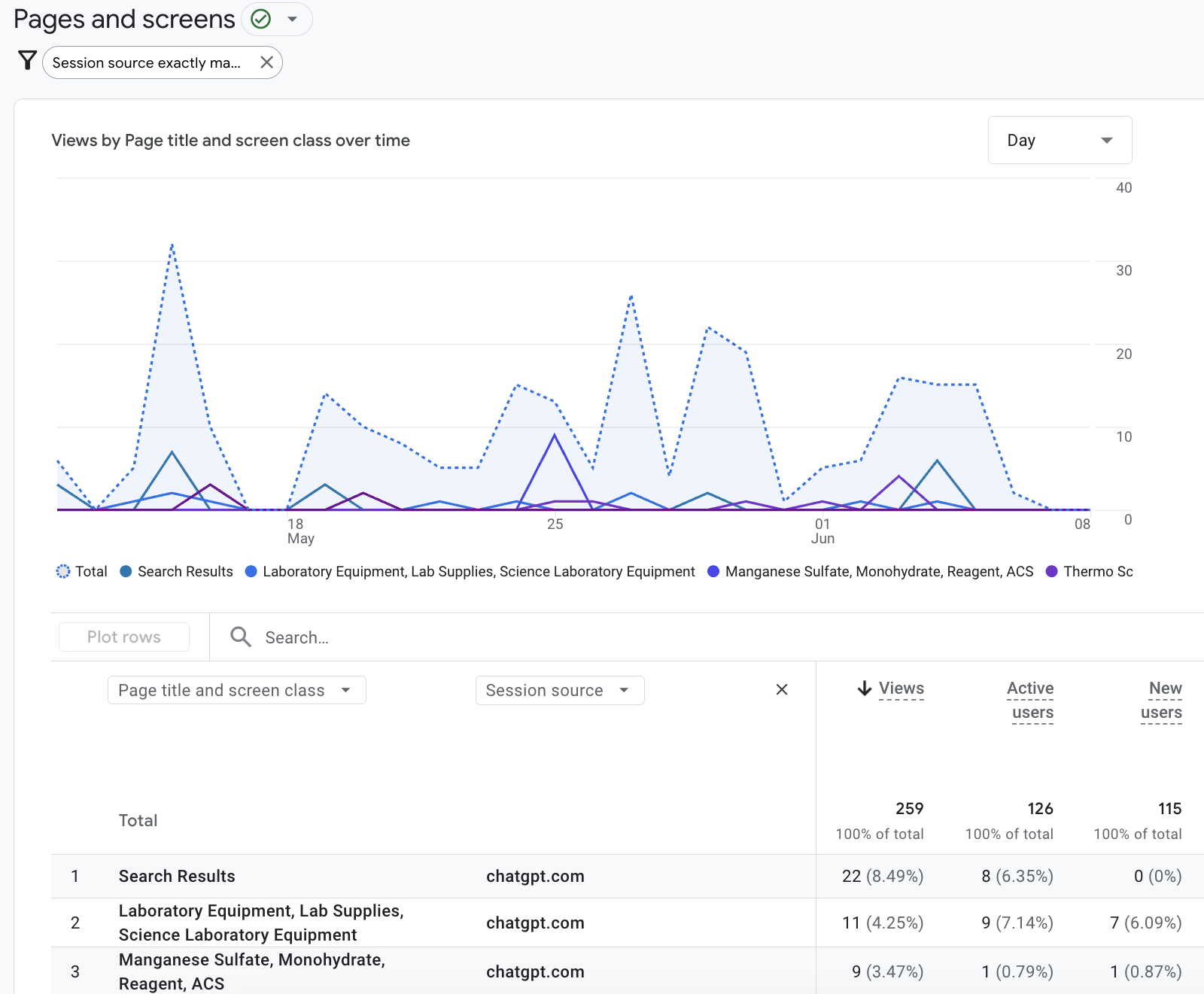
To use this method, go to your pages report in GA4 and add a filter that targets the session source. Follow these steps to track traffic from ChatGPT:
- Locate the Engagement section.
- Look for the Page path + query string dimension under Pages and screens.
- Click the Add filter + button at the top part of the report.
- Choose Session Source under the Traffic dimension in the filter settings.
- Select “exactly matches” as the match type.
- Select chatgpt.com from the value dropdown list.
- Click the Apply button.
This is the more straightforward method of the two. It’s quick to set up and gives a basic overview of your LLM traffic. However, it might not show the full picture, especially if you’re looking for deeper insights.
Create a GA4 Exploration
For more detailed and actionable insights, this method offers a better view. Explorations are advanced reports that let you dive deeper into user behavior and traffic sources.
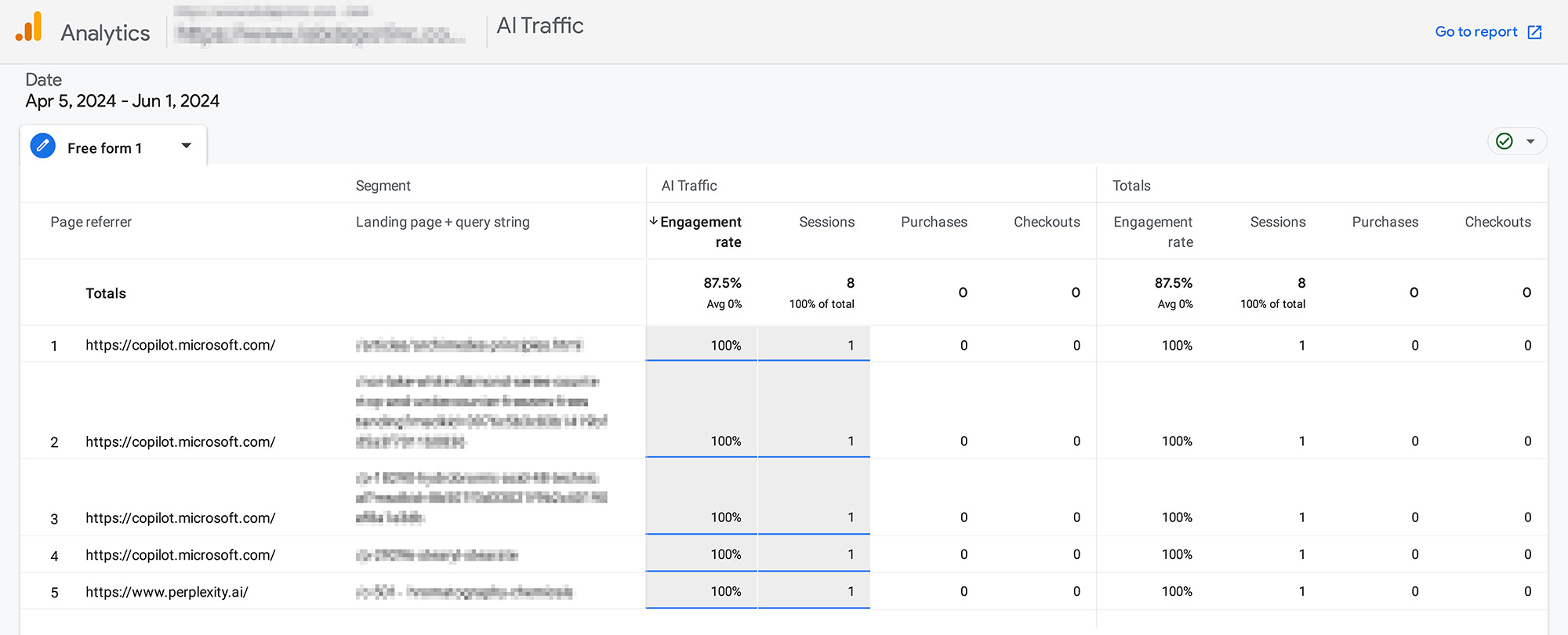
Using a GA4 exploration requires using a regular expression or regex, a pattern-matching formula that allows you to include multiple domains in one view. It can show traffic from multiple sources like OpenAI, Anthropic, or Perplexity, so you can compare and analyze traffic patterns across platforms more effectively.
Here’s how to create a new Exploration report:
- Click the Blank button.
- Assign a name for your exploration.
- Choose a long date range to view more data.
- Create a new session segment and set a name for it.
- Input the following regex and click the Apply button.
^https:\/\/(www\.meta\.ai|www\.perplexity\.ai|chat\.openai\.com|claude\.ai|chat\.mistral\.ai|gemini\.google\.com|chatgpt\.com|copilot\.microsoft\.com|copy\.ai)(\/.*)?$|.*\.ai.*|.*\.openai.*|.*\.groq.*|.*\.metaai.*|.*\.meta\.com/ai.*
^.*ai|.*\.openai.*|.*copilot.*|.*chatgpt.*|.*gemini.*|.*gpt.*|.*neeva.*|.*writesonic.*|.*nimble.*|.*outrider.*|.*perplexity.*|.*google.*bard.*|.*bard.*google.*|.*bard.*|.*edgeservices.*|.*astastic.*|.*copy.ai.*|.*bnngpt.*|.*gemini.*google.*$
Tracking AI traffic isn’t just a technical task; it’s a strategic one. It gives you a clearer view of how your content is being discovered, summarized, or shared in a changing digital landscape.
Need Help Segmenting LLM Traffic?
Let the Lumenvo team handle it. Our marketing experts can segment and analyze your LLM traffic and then turn that data into clear actions to strengthen your SEO. Reach out today, and we’ll help ensure your content is seen, no matter where the search begins.
Blog Categories
Digital Marketing Guides
Digital Marketing Guides
READ MOREDesign Guides
Design Guides
READ MORELife at Lumenvo
Life at Lumenvo
READ MOREWeb Development Guides
Web Development Guides
READ MOREKeeping Up with Google
Keeping Up with Google
READ MOREAbout
Lumenvo elevates your business through cost-effective, superior-quality digital services that value the human connection in today’s digital world.
Explore
Contact
-
2856 Johnson Ferry Rd.
Suite 250
Marietta, GA 30062 - help@lumenvo.com
- (678) 856-3297


Copyright © 2023 Lumenvo Digital Marketing Agency. All rights reserved.